forEach method in JavaScript + GIVEAWAY
Updated
•2 min read
The main purpose of forEach method is it executes a provided function once for each array element. In other words, iterates over the array. Often used in functional programming. Always returns undefined.
// SYNTAX:
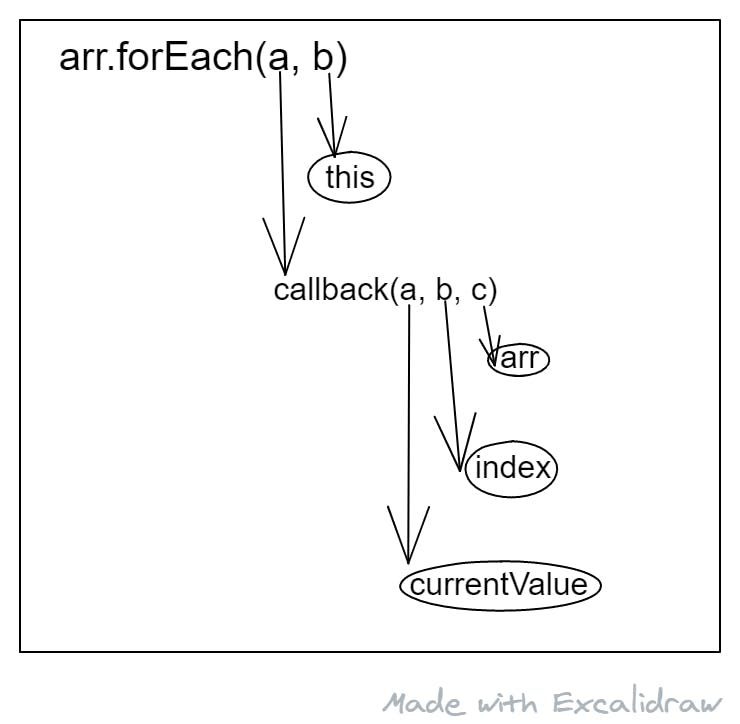
arr- The array forEach is iterating onthis- A value to use as this when executing callback (optional)callback- A fucntion executed once for each arr element
Argumnet passed to the callback function:
currentValue- The current element being processed in the array.index- The index of the current element being processed in the array (optional)arr- The whoole array forEach is iterating on(optional)
Let's do something
let arr = ['a', 'b', 'c', 'd']

arr.forEach((el, i, arr) => {
    console.log(el)
});

// Logs each string form arr in the console. Let's say we want to log each element in the array until we meet a 'c' character. Then the forEach loop.

// But actually - there's no way to exit (stop) the while for Each! We can only exit the current iteration.

// That's when you should go and use a loop. If not, here's a way to do it with forEach:

let meet = true
arr.forEach((el, i, arr) => {
    if (el === 'c') meet = false;
    if (meet) console.log(el);
}) // log ['a', 'b']

// now the same thing using a for loop:
for (let i = 0; i <= arr.length; i++) {
    if (arr[i] === 'c') brake;
    console.log(arr[i]);
}

// In this previous situation it was better to just use a loop. Now I will show you a case where it's the opposite.

let copy = []

// before
for (let i = 0; i < arr.length; i++ ) {
    copy.push(arr[i])
}

// after
arr.forEach( el => copy.push(el))
Facts:-
- it always returns true
- expects the callback function to synchronous
- you can't stop its iteration
- very powerful when chained with another method
- support by all modern browsers
🚨GIVEAWAY 🚨
— RAHUL (@rahxul) May 12, 2021
I've 300 Followers on Twitter Finally 🤩. So I'm giving away a 3 BUNDLES that consists of
- Udemy Course
- 3 eBook (Growth, Marketing and Productivity)
Enter now:
🎯Follow me
🔄Retweet this tweet
💕Like this tweet
(Next thread for more details)#Giveaways pic.twitter.com/lhqj3HNRu8
Thanks for Reading😅


